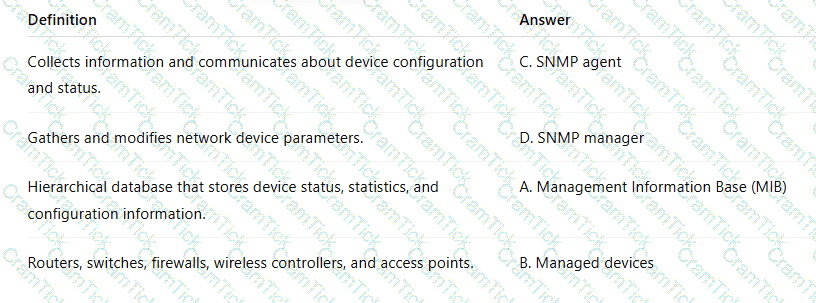
A Windows PC is not able to browse the Internet. Based on the output, what could be the problem?
Windows IP Configuration
Ethernet adapter Ethernet:
Connection-specific DNS Suffix : arubatraining.com
IPv4 Address : 10.211.55.151
Subnet Mask : 255.255.255.0
Default Gateway : 10.211.55.1
Access-1# show run int vlan 55
interface vlan 55
description Workstations
ip address 10.211.55.1/25
Access-1# show run int 1/1/12
interface 1/1/12
no shutdown
description PC
vlan access 55
spanning-tree port-type admin-edge
exit
A newly connected 500 Series access point is not visible in HPE Aruba Networking Central. You have run the following commands to troubleshoot:
Access-1# show run int vlan 10
interface vlan10
description Infrastructure Management
ip address 10.80.10.1/24
ip helper-address 10.200.10.51
exit
Access-1# show run int 1/1/1
interface 1/1/1
no shutdown
description Access Point
vlan trunk native 10
vlan trunk allowed 10,20,30
exit
Access-1# show lldp neighbor-info 1/1/1
Port : 1/1/1
Neighbor Entries : 1
Neighbor System-Name : b8:37:b2:5f:21:21
Neighbor System-Description : ArubaOS (MODEL: AP-505R), Version Aruba IAP
Neighbor Management-Address : 169.254.2.58
Neighbor Port-ID : b8:37:b2:5f:21:21
Neighbor Port-DESC : eth0
Based on the output, what could be the problem?
A customer requires a network upgrade to replace their existing access switches. The new solution must support 25G speeds to the aggregation layer, with a maximum physical space of 1U, and it must be a fixed switch solution.
Which HPE Aruba Networking CX switch model would you initially propose?
Which user group exists by default on an HPE Aruba Networking CX 8400 Series switch?
A CX 6200 VSF stack is the Layer 3 gateway for a mid-sized company. Users are divided into three different subnets on VLANs 100, 200, and 300. VLAN 50 contains a management network for access points, switches, and DHCP servers.
How do the access points get an IP address using DHCP?
How do you configure an in-band management IP address for the HPE Aruba Networking CX 4100i switch?
Based on the example below:
show vsf
Force Autojoin : Disabled
Autojoin Eligibility Status : Not Eligible
MAC Address : ec:67:94:c4:77:80
Secondary : 2
Topology : Ring
Status : No Split
Split Detection Method : mgmt
Mbr Mac Address Type Status
ID
--- ------------------- ------- ----------
1 ec:67:94:c4:77:80 R8Q69A Conductor
2 ec:67:94:c4:37:80 R8Q69A Standby
3 ec:67:94:c5:7f:80 R8Q68A Member
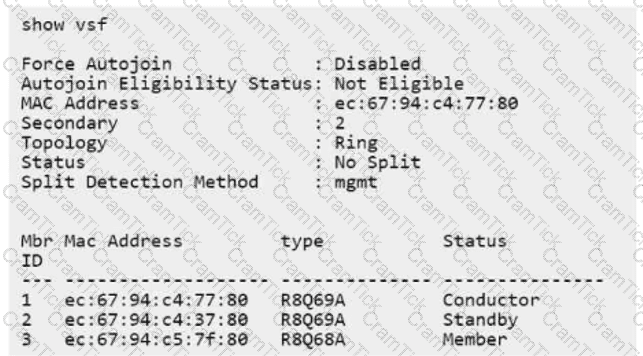
How is the VSF integrity verified if the VSF links between members 1 and 3, and members 2 and 3, are disconnected?
In the partial example of the LLDP output below:
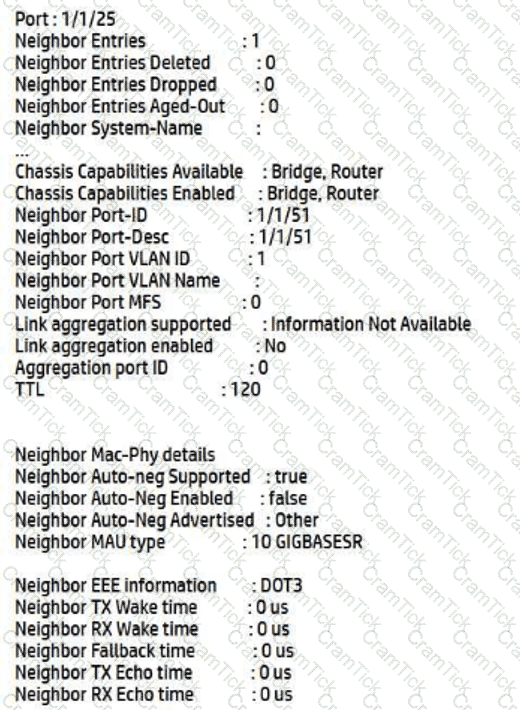
Port: 1/1/25
Neighbor Entries : 1
Neighbor Entries Deleted : 0
Neighbor Entries Dropped : 0
Neighbor Entries Aged-Out : 0
Neighbor System-Name :
Chassis Capabilities Available : Bridge, Router
Chassis Capabilities Enabled : Bridge, Router
Neighbor Port-ID : 1/1/51
Neighbor Port-Desc : 1/1/51
Neighbor Port VLANID : 1
Neighbor Port VLAN Name :
Neighbor Port MFS :
Link aggregation supported : Information Not Available
Link aggregation enabled : No
Aggregation port ID : 0
TTL : 120
Neighbor Mac-Phy details
Neighbor Auto-Neg Supported : true
Neighbor Auto-Neg Enabled : false
Neighbor Auto-Neg Advertised : Other
Neighbor MAU type : 10GIGBASER
What can be validated based on the provided output?
Your colleague is installing a new HPE Aruba Networking CX 8100 switch in a data center in the default configuration. You monitor the peer switch port 1/1/1 status, connected with a 10Gb 3m DAC cable to the new switch, and validate that the cable is attached. The port remains down.
What should you suggest your colleague do so the port can come online?
You are creating a physical connectivity diagram for a network documentation project.
Which feature will be the most useful to you?
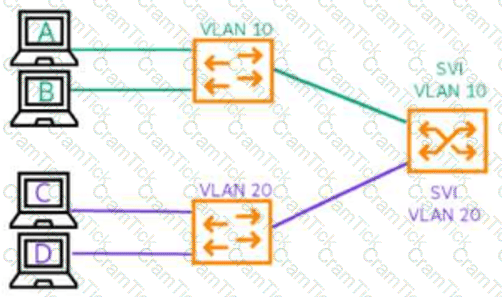
Refer to the diagram below.
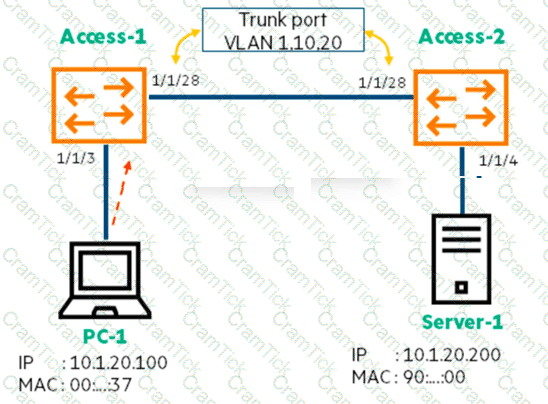
After a recent network change, the helpdesk reports that some users could not connect to the print server, Server-1, which is in VLAN 20. After further investigation, you find that only devices directly connected to Access-2 are affected.
Which part of the network should you investigate?
You are discussing the central management options for HPE Aruba Networking CX switches with a customer.
How would you describe HPE Aruba Networking Central as a solution?
A retail store chain customer is replacing 1,496 AOS-S switches with HPE Aruba Networking CX 6000 switches. The customer is interested in using ZTP to provision the new switches. However, they are concerned about when the switch starts the ZTP process and whether ZTP may change configurations on switches that are already deployed.
What would address this concern?
How can you describe HPE Aruba Networking stacking technologies supported to a new customer focused on another vendor’s products?
You are about to log a support case with TAC for an issue with your HPE Aruba Networking CX switch.
What should you have ready in advance to provide them?
Which user group exists by default on an HPE Aruba Networking CX 6400 Series switch?
Which customer use case would be ideal for an HPE Aruba Networking Central On-Premises deployment?
A network is configured with two HPE Aruba Networking 2930F switches as the aggregation layer. Each 2930F switch has ten connections. The network has twenty HPE Aruba Networking 2530 access switches connected to both aggregation switches with 1 Gb RJ45 links. Your task is to replace the aggregation switches with HPE Aruba Networking CX 6200 models.
In this scenario, which configuration would provide redundancy using two ports on the access switches to the aggregation layer?
You would like to monitor your HPE Aruba Networking CX switches from your existing Network Management System using SNMP and ensure the data is encrypted.
Which version should you enable on the switches?




TESTED 14 Sep 2026