HTML5 Application Development
Last Update Oct 5, 2026
Total Questions : 68
Why Choose CramTick

Last Update Oct 5, 2026
Total Questions : 68

Last Update Oct 5, 2026
Total Questions : 68

Customers Passed
IT Specialist INF-306
Average Score In Real
Exam At Testing Centre
Questions came word by
word from this dump

Try a free demo of our IT Specialist INF-306 PDF and practice exam software before the purchase to get a closer look at practice questions and answers.

We provide up to 3 months of free after-purchase updates so that you get IT Specialist INF-306 practice questions of today and not yesterday.

We have a long list of satisfied customers from multiple countries. Our IT Specialist INF-306 practice questions will certainly assist you to get passing marks on the first attempt.

CramTick offers IT Specialist INF-306 PDF questions, and web-based and desktop practice tests that are consistently updated.

CramTick has a support team to answer your queries 24/7. Contact us if you face login issues, payment, and download issues. We will entertain you as soon as possible.

Thousands of customers passed the IT Specialist HTML5 Application Development exam by using our product. We ensure that upon using our exam products, you are satisfied.
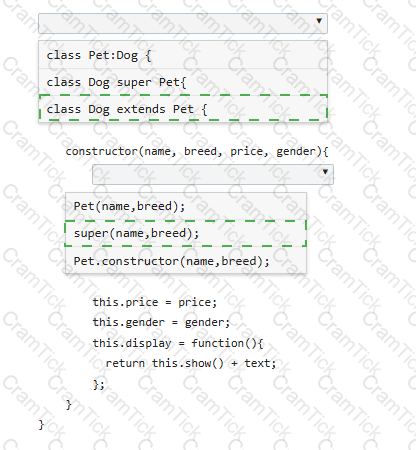
You define the Pet class as follows:
class Pet {
constructor(name, breed) {
this.name = name;
this.breed = breed;
this.show = function() {
var text = " < p > Your pet ' s name is " + name + " . The pet ' s breed is " + breed + " . < /p > " ;
return text;
};
}
}
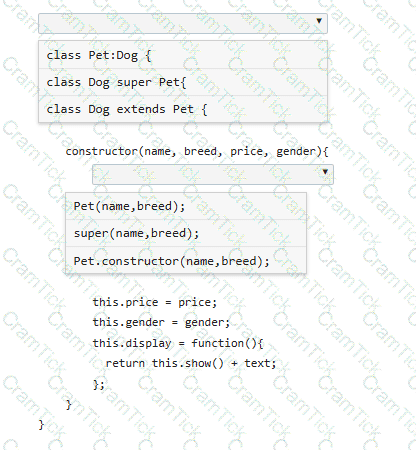
You need to derive a Dog class from the Pet class.
Complete the code by selecting the correct option from each drop-down list.
Note: You will receive partial credit for each correct selection.
The following form is missing validation attributes:
< form >
< div class= " container " >
< h1 > Register Here < /h1 >
< p > Please fill in the details to create an account with us. < /p >
< hr >
< label for= " ? " > < b > Enter Email < /b > < /label >
< input type= " ? " placeholder= " Enter Email " name= " ? " placeholder= " username@domain.com " >
< label for= " ? " > < b > Password < /b > < /label >
< input type= " ? " placeholder= " Enter Password " name= " ? " >
< label for= " ? " > < b > Confirm Password < /b > < /label >
< input type= " ? " placeholder= " Confirm Password " name= " ? " >
< label for= " phone " > < b > Phone < /b > < /label >
< input type= " tel " id= " phone " name= " phone " placeholder= " 123-45-678 " >
< hr >
< p > By creating an account you agree to our < a href= " # " > Terms & Privacy < /a > . < /p >
< button type= " submit " class= " registerbtn " > < strong > Register < /strong > < /button >
< /div >
< /form >
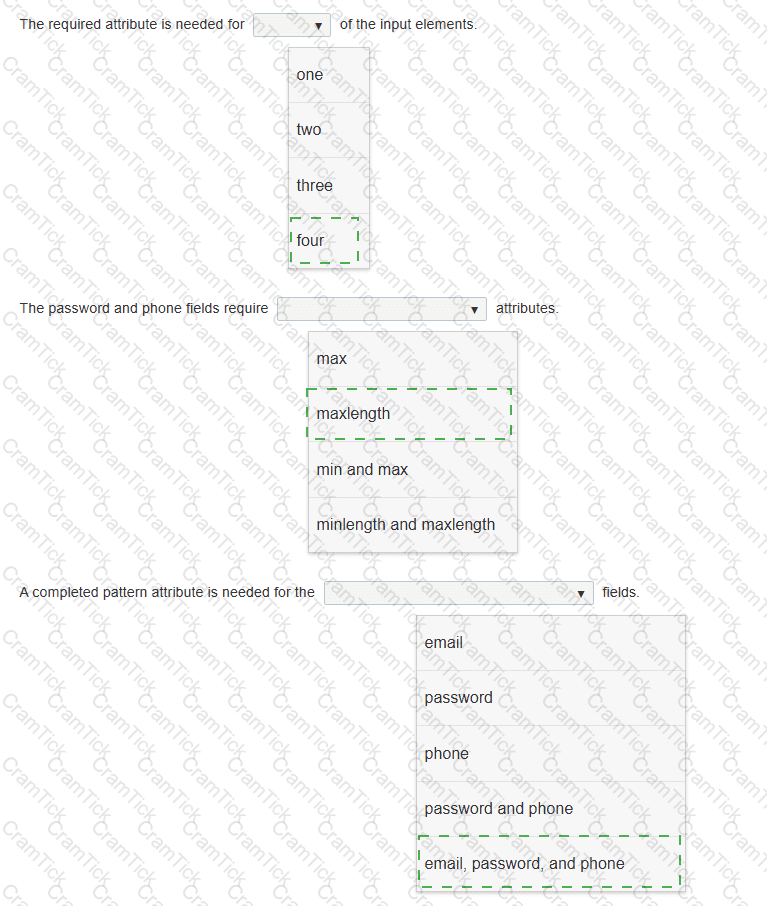
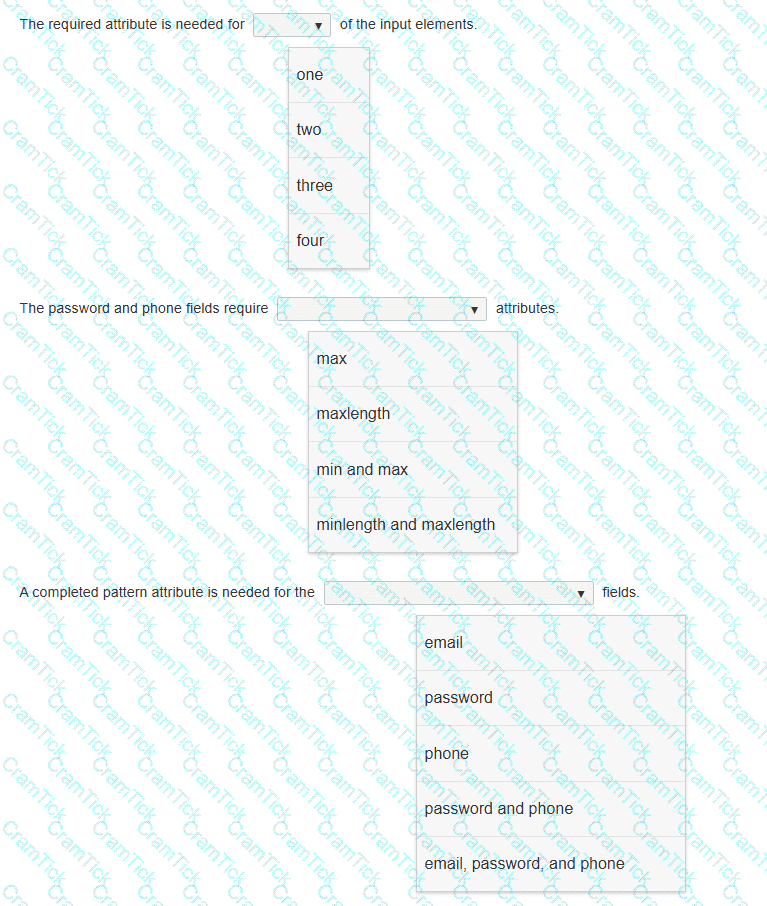
You need to update the form to enforce the following requirements for visitors:
• All fields must be completed with valid information.
• The users should not be allowed to type passwords longer than 8 characters.
• Passwords must use only numbers and letters.
• Phone numbers and email addresses must follow the configuration of the placeholder text.
• The browser must display an error message that makes it clear what type of input change is needed.
Review the markup on the left.
Complete the sentences by selecting the correct option from each drop-down list.
Note: You will receive partial credit for each correct selection.
Which CSS property defines the sides of an element where other floating elements are not allowed?

TESTED 05 Oct 2026