Which statement about automation connectors in FortiAnalyzer is true?
An ADOM with the Fabric type comes with multiple connectors configured.
The local connector becomes available after you configured any external connector.
The local connector becomes available after you connectors are displayed.
The actions available with FortiOS connectors are determined by automation rules configured on FortiGate.
When managing incidents on FortiAnlyzer, what must an analyst be aware of?
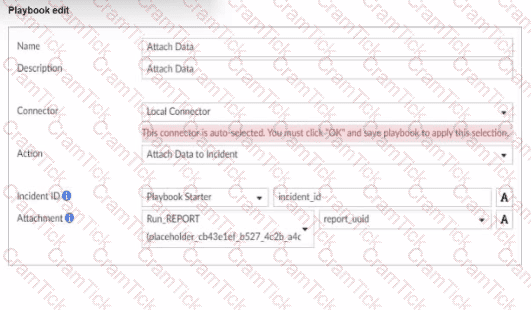
You can manually attach generated reports to incidents.
The status of the incident is always linked to the status of the attach event.
Severity incidents rated with the level High have an initial service-level agreement (SLA) response time of 1 hour.
Incidents must be acknowledged before they can be analyzed.
In FortiAnalyzer's incident management system, analysts have the option to manually manage incidents, which includes attaching relevant reports to an incident for further investigation and documentation. This feature allows analysts to consolidate information, such as detailed reports on suspicious activity, into an incident record, providing a comprehensive view for incident response.
Let's review the other options to clarify why they are incorrect:
Option A: You can manually attach generated reports to incidents
This is correct. FortiAnalyzer allows analysts to manually attach reports to incidents, which is beneficial for providing additional context, evidence, or analysis related to the incident. This functionality is part of the incident management process and helps streamline information for tracking and resolution.
Option B: The status of the incident is always linked to the status of the attached event
This is incorrect. The status of an incident on FortiAnalyzer is managed independently of the status of any attached events. An incident can contain multiple events, each with different statuses, but the incident itself is tracked separately.
Option C: Severity incidents rated with the level High have an initial service-level agreement (SLA) response time of 1 hour
This is incorrect. While incidents have severity levels, specific SLA response times are typically set according to the organization’s incident response policy, and FortiAnalyzer does not impose a default SLA response time of 1 hour for high-severity incidents.
Option D: Incidents must be acknowledged before they can be analyzed
This is incorrect. Incidents on FortiAnalyzer can be analyzed even if they are not yet acknowledged. Acknowledging an incident is often part of the workflow to mark it as being actively addressed, but it is not a prerequisite for analysis.
You mustfind a specific security event log in the FortiAnalyzer logs displayed in FortiView, but, so far, you have been uncuccessful.
Which two tasks should you perform to investigate why you are having this issue? (Choose two.)
Open .gz log files in FortiView.
Rebuild the SQL database and check FortiView.
Review the ADOM data policy
Check logs in the Log Browse
As part of your analysis, you discover that an incident is a false positive.
You change the incident status to Closed: False Positive.
Which statement about your update is true?
The audit history log will be updated.
The corresponding event will be marked as mitigated.
The incident will bedeleted.
The incident number will be changed
When an incident in FortiAnalyzer is identified as a false positive and its status is updated to "Closed: False Positive," certain records and logs are updated to reflect this change.
Option A - The Audit History Log Will Be Updated:
FortiAnalyzer maintains an audit history log that records changes to incidents, including updates to their status. When an incident status is marked as "Closed: False Positive," this action is logged in the audit history to ensure traceability of changes. This log provides accountability and a record of how incidents have been handled over time.
Conclusion:Correct.
Option B - The Corresponding Event Will Be Marked as Mitigated:
Changing an incident to "Closed: False Positive" does not affect the status of the original event itself. Marking an incident as a false positive signifies that it does not represent a real threat, but it does not imply that the event has been mitigated.
Conclusion:Incorrect.
Option C - The Incident Will Be Deleted:
Marking an incident as "Closed: False Positive" does not delete the incident from FortiAnalyzer. Instead, it updates the status to reflect that it is not a real threat, allowing for historical analysis and preventing similar false positives in the future. Deletion would typically only occur manually or by a different administrative action.
Conclusion:Incorrect.
Option D - The Incident Number Will Be Changed:
The incident number is a unique identifier and does not change when thestatus of the incident is updated. This identifier remains constant throughout the incident's lifecycle for tracking and reference purposes.
Conclusion:Incorrect.
Conclusion:
Correct Answer:A. The audit history log will be updated.
This is the most accurate answer, as the update to "Closed: False Positive" is recorded in FortiAnalyzer’s audit history log for accountability and tracking purposes.
Which two statement regarding the outbreak detection service are true? (Choose two.)
An additional license is required.
It automatically downloads new event handlers and reports.
Outbreak alerts are available on the root ADOM only.
New alerts are received by email.
Which statement about SQL SELECT queries is true?
They can be used to purge log entries from the database.
They must be followed immediately by a WHEREclause.
They can be used to display the database schema.
They are not used in macros.
Option A - Purging Log Entries:
A SELECT query in SQL is used to retrieve data from a database and does not have the capability to delete or purge logentries. Purging logs typically requires a DELETE or TRUNCATE command.
Conclusion:Incorrect.
Option B - WHERE Clause Requirement:
In SQL, a SELECT query does not require a WHERE clause. The WHERE clause is optional and is used only when filtering results. A SELECT query can be executed without it, meaning this statement is false.
Conclusion:Incorrect.
Option C - Displaying Database Schema:
A SELECT query retrieves data from specified tables, but it is not used to display the structure or schema of the database. Commands like DESCRIBE, SHOW TABLES, or SHOW COLUMNS are typically used to view schema information.
Conclusion:Incorrect.
Option D - Usage in Macros:
FortiAnalyzer and similar systems often use macros for automated functions or specific query-based tasks. SELECT queries are typically not included in macros because macros focus on procedural or repetitive actions, rather than simple data retrieval.
Conclusion:Correct.
Conclusion:
Correct Answer:D. They are not used in macros.
This aligns with typical SQL usage and the specific functionalities of FortiAnalyzer.
Which two statements about local logs on FortiAnalyzer are true? (Choose two.)
They are not supported in FortiView.
You can view playbook logs for all ADOMs in the root ADOM.
Event logs show system-wide information, whereas application logs are ADOM specific.
Event logs are available only in the root ADOM.
FortiAnalyzer manages and stores various types of logs, including local logs, across different ADOMs (Administrative Domains). Each type of log servesspecific purposes, with some logs being ADOM-specific and others providing system-wide information.
Option A - Local Logs Not Supported in FortiView:
Local logs are indeed supported in FortiView. FortiView provides visibility and analytics for different log types across the system, including local logs, allowing users to view and analyze data efficiently.
Conclusion:Incorrect.
Option B - Playbook Logs for All ADOMs in the Root ADOM:
FortiAnalyzer allows centralized viewing of playbook logs across all ADOMs from the root ADOM. This feature provides an overarching view of playbook executions, facilitating easier monitoring and management for administrators.
Conclusion:Correct.
Option C - Event Logs vs. Application Logs:
Event Logsprovide information about system-wide events, such as login attempts, configuration changes, and other critical activities that impact the overall system. These logs apply across the FortiAnalyzer instance.
Application Logsare more specific to individual ADOMs, capturing details that pertain to ADOM-specific applications and configurations.
Conclusion:Correct.
Option D - Event Logs Only in Root ADOM:
Event logs are available across different ADOMs, not exclusively in the root ADOM. They capture system-wide events, but they can be accessed within specific ADOM contexts as needed.
Conclusion:Incorrect.
Conclusion:
Correct Answer:B. You can view playbook logs for all ADOMs in the root ADOMandC. Event logs show system-wide information, whereas application logs are ADOM specific.
These answers correctly describe the characteristics and visibility of local logs within FortiAnalyzer.
After a generated a repot, you notice the information you were expecting to see in not included in it. However, you confirm that the logs are there:
Which two actions should you perform? (Choose two.)
Check the time frame covered by the report.
Disable auto-cache.
Increase the report utilization quota.
Test the dataset.
When a generated report does not include the expected information despite the logs being present, there are several factors to check to ensure accurate datarepresentation in the report.
Option A - Check the Time Frame Covered by the Report:
Reports are generated based on a specified time frame. If the time frame does not encompass the period when the relevant logs were collected, those logs will not appear in the report. Ensuring the time frame is correctly set to cover the intended logs is crucial for accurate report content.
Conclusion:Correct.
Option B - Disable Auto-Cache:
Auto-cache is a feature in FortiAnalyzer that helps optimize report generation by using cached data for frequently used datasets. Disabling auto-cache is generally not necessary unless there is an issue with outdated data being used. In most cases, it does not directly impact whether certain logs are included in a report.
Conclusion:Incorrect.
Option C - Increase the Report Utilization Quota:
The report utilization quota controls the resource limits for generating reports. While insufficient quota might prevent a report from generating or completing, it does not typically cause specific log entries to be missing. Therefore, this option is not directly relevant to missing data within the report.
Conclusion:Incorrect.
Option D - Test the Dataset:
Datasets in FortiAnalyzer define which logs and fields are pulled into the report. If a dataset is misconfigured, it could exclude certain logs. Testing the dataset helps verify that the correct data is being pulled and that all required logs are included in the report parameters.
Conclusion:Correct.
Conclusion:
Correct Answer:A. Check the time frame covered by the reportandD. Test the dataset.
These actions directly address the issues that could cause missing information in a report when logs are available but not displayed.
(You created a playbook on FortiAnalyzer that uses a FortiOS connector. When you configure FortiGate, which type of trigger must you use so that the actions in an automation stitch are available in the FortiOS connector? (Choose one answer))
FortiAnalyzer Event Handler
Incoming webhook
Fabric Connector event
IP ban
Comprehensive and Detailed Explanation From Exact Extract of knowledge of FortiAnalyzer 7.6 Study guide documents:
The study guide explains that FortiAnalyzer playbook tasks rely on connectors, and that the FortiOS connector will not show its available actions until FortiGate is configured with the correct automation trigger. The guide states:“For example, the FortiOS connector will be listed as soon as the first FortiGate device is added to FortiAnalyzer. However, to see the actions related to that FortiOS connector, you must enable an automation rule using the Incoming Webhook Call trigger on FortiGate.”
This is why the required FortiGate trigger type isIncoming webhook(option B): it is the specific trigger FortiOS must use so FortiAnalyzer can expose and use the FortiOS connector actions within the playbook workflow.
(Which two parameters does FortiAnalyzer use to identify an indicator of compromise (IOC)? (Choose two answers))
IP address
URL
Policy ID
Application category
Comprehensive and Detailed Explanation From Exact Extract of knowledge of FortiAnalyzer 7.6 Study guide documents:
The FortiAnalyzer study guide explains that IOC identification is performed by comparing relevant log fields against the FortiGuard threat database. Specifically, it states:“Depending on the log type, FortiAnalyzer identifies possible compromised hosts by checking the threat database against the log's IP address, domain, and URL.”
From this extract, two of the explicit parameters FortiAnalyzer uses for IOC detection areIP addressandURL(both listed verbatim). Policy ID and application category are not part of the IOC matching parameters described for threat-database checks in this context.
This is further consistent with the study guide’s definition of indicator types, which states:“There are three types of indicators: IP addresses, URLs, and domains.”
Which statement about sending notifications with incident updates is true?
Each connector used can have different notification settings
Each incident can send notification to a single external platform.
You must configure an output profile to send notifications by email.
Notifications can be sent only when an incident is created oi deleted.
Which SQL query is in the correct order to query to database in the FortiAnalyzer?
SELECT devid FROM $log GROUP BY devid WHERE ‘user’,,’ users1’
SELECT FROM $log WHERE devid ‘user’,, USER1’ GROUP BY devid
SELCT devid WHERE ’user’-‘ USER1’ FROM $log GROUP By devid
SELECT devid FROM $log WHERE ‘user’=’ GROUP BY devid
In FortiAnalyzer’s SQL query syntax, the typical order for querying the database follows the standard SQL format, which is:
SELECT Option Dcorrectly follows this structure: SELECT devid FROM $log: This specifies that the query is selecting the devid column from the $log table. WHERE 'user' = ': This part of the query is intended to filter results based on a condition involving the user column. Although there appears to be a minor typographical issue (possibly missing the user value after =), it structurally adheres to the correct SQL order. GROUP BY devid: This groups the results by devid, which is correctly positioned at the end of the query. Let’s briefly examine why the other options are incorrect: Option A: SELECT devid FROM $log GROUP BY devid WHERE 'user', 'users1' This is incorrect because the GROUP BY clause appears before the WHERE clause, which is out of order in SQL syntax. Option B: SELECT FROM $log WHERE devid 'user', USER1' GROUP BY devid This is incorrect because it lacks a column in the SELECT statement and the WHERE clause syntax is malformed. Option C: SELCT devid WHERE 'user' - 'USER1' FROM $log GROUP BY devid This is incorrect because the SELECT keyword is misspelled as SELCT, and the WHERE condition syntax is invalid. As part of your analysis, you discover that a Medium severity level incident is fully remediated. You change the incident status to Closed:Remediated. Which statement about your update is true? The incident can no longer be deleted. The corresponding event will be marked as Mitigated. The incident dashboard will be updated. The incident severity will be lowered. What are the two methods you can use to send notifications when an event is generated by an event handler? (Choose two answers) Send SNMP trap. Send an alert through the FortiGuard server. Send an alert through Fabric connectors. Send SMS notification Comprehensive and Detailed Explanation From Exact Extract of knowledge of FortiAnalyzer 7.6 Study guide documents: FortiAnalyzer event handlers support alerting when a rule match generates an event. The study guide states that, for an event handler,“You can select a notification profile to send alerts whenever an event is generated by the handler.”In FortiAnalyzer, notification profiles are the mechanism used to deliver alerts outward (for example, via an SNMP trap), which directly aligns with optionA. In addition, FortiAnalyzer supports sending notifications to external platforms through integrations:“You can configure FortiAnalyzer to send a notification to external platforms using preconfigured Fabric connectors.”This validates the use ofFabric connectorsas a notification delivery method, aligning with optionC. OptionBis not a notification delivery method for event-handler-generated alerts in the workflow described (FortiGuard is used for threat intelligence/enrichment rather than relaying alerts). OptionDis not presented in the study guide’s described notification mechanisms for event-handler alerting in the referenced sections. Which statement about the FortiSOAR management extension is correct? It requires a FortiManager configured to manage FortiGate. It runs as a docker container on FortiAnalyzer. It requires a dedicated FortiSOAR device or VM. It does not include a limited trial by default. The FortiSOAR management extension is designed as an independent security orchestration, automation, and response (SOAR) solution that integrates with other Fortinet products but requires its own dedicated device or virtual machine (VM) environment. FortiSOAR is not natively integrated as a container or service within FortiAnalyzer or FortiManager, and it operates separately to manage complex security workflows and incident responses across various platforms. Let’s examine each option to determine the correct answer: Option A: It requires a FortiManager configured to manage FortiGate This is incorrect. FortiSOAR operates independently of FortiManager. While FortiSOAR can receive input or data from FortiGate (often managed by FortiManager), it does not require FortiManager to be part of its setup. Option B: It runs as a docker container on FortiAnalyzer This is incorrect. FortiSOAR does not run as a container within FortiAnalyzer. It requires its own dedicated environment, either as a physical device or a virtual machine, due to the resource requirements and specialized functions itperforms. Option C: It requires a dedicated FortiSOAR device or VM This is correct. FortiSOAR is deployed as a standalone device or VM, which enables it to handle the intensive processing needed for orchestrating security operations, integrating with third-party tools, and automating responses across an organization’s security infrastructure. Option D: It does not include a limited trial by default This is incorrect. FortiSOAR installations may come with trial options or demos in specific scenarios, especially for evaluation purposes. This depends on licensing and deployment policies. Which statement about exporting items in Report Definitions is true? Templates can be exported. Template exports contain associated charts and datasets. Chart exports contain associated datasets. Datasets can be exported. Which log will generate an event with the status Unhandled? An AV log with action=quarantine. An IPS log with action=pass. A WebFilter log willaction=dropped. An AppControl log with action=blocked. In FortiOS 7.4.1 and FortiAnalyzer 7.4.1, the "Unhandled" status in logs typically signifies that the FortiGate encountered a security event but did not take any specific action toblock or alter it. This usually occurs in the context of Intrusion Prevention System (IPS) logs. IPS logs with action=pass:When the IPS engine inspects traffic and determines that it does not match any known attack signatures or violate any configured policies, it assigns the action "pass". Since no action is taken to block or modify this traffic, the status is logged as "Unhandled." Let's look at why the other options are incorrect: An AV log with action=quarantine:Antivirus (AV) logs with the action "quarantine" indicate that a file was detected as malicious and moved to quarantine. This is a definitive action, so the status wouldn't be "Unhandled." A WebFilter log will action=dropped:WebFilter logs with the action "dropped" indicate that web traffic was blocked according to the configured web filtering policies. Again, this is a specific action taken, not an "Unhandled" event. An AppControl log with action=blocked:Application Control logs with the action "blocked" mean that an application was denied access based on the defined application control rules. This is also a clear action, not "Unhandled." TESTED 28 Dec 2025 Copyright © 2014-2025 CramTick. All Rights Reserved WHERE
Options:
Answer:
C
Options:
Answer:
A, C
Explanation:
Options:
Answer:
C
Explanation:
Options:
Answer:
C
Options:
Answer:
B
Explanation:
Quick Links
Recently New Released Certification Exams
Site Secure