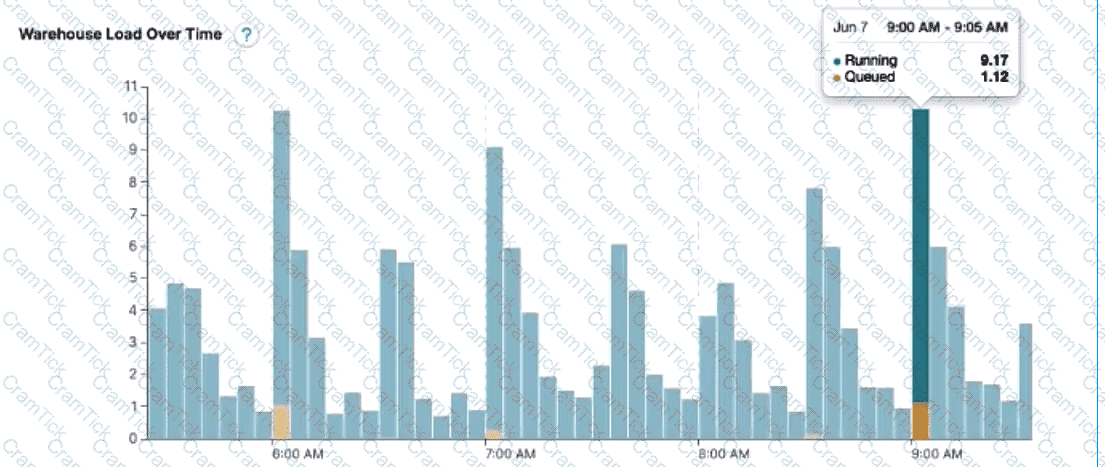
An Architect needs to improve the performance of reports that pull data from multiple Snowflake tables, join, and then aggregate the data. Users access the reports using several dashboards. There are performance issues on Monday mornings between 9:00am-11:00am when many users check the sales reports.
The size of the group has increased from 4 to 8 users. Waiting times to refresh the dashboards has increased significantly. Currently this workload is being served by a virtual warehouse with the following parameters:
AUTO-RESUME = TRUE AUTO_SUSPEND = 60 SIZE = Medium
What is the MOST cost-effective way to increase the availability of the reports?
Use materialized views and pre-calculate the data.
Increase the warehouse to size Large and set auto_suspend = 600.
Use a multi-cluster warehouse in maximized mode with 2 size Medium clusters.
Use a multi-cluster warehouse in auto-scale mode with 1 size Medium cluster, and set min_cluster_count = 1 and max_cluster_count = 4.
The most cost-effective way to increase the availability and performance of the reports during peak usage times, while keeping costs under control, is to use a multi-cluster warehouse in auto-scale mode. Option D suggests using a multi-cluster warehouse with 1 size Medium cluster and allowing it to auto-scale between 1 and 4 clusters based on demand. This setup ensures that additional computing resources are available when needed (e.g., during Monday morning peaks) and are scaled down to minimize costs when the demand decreases. This approach optimizes resource utilization and cost by adjusting the compute capacity dynamically, rather than maintaining a larger fixed size or multiple clusters continuously.
Which of the following are characteristics of Snowflake’s parameter hierarchy?
Session parameters override virtual warehouse parameters.
Virtual warehouse parameters override user parameters.
Table parameters override virtual warehouse parameters.
Schema parameters override account parameters.
In Snowflake's parameter hierarchy, virtual warehouse parameters take precedence over user parameters. This hierarchy is designed to ensure that settings at the virtual warehouse level, which typically reflect the requirements of a specific workload or set of queries, override the preferences set at the individual user level. This helps maintain consistent performance and resource utilization as specified by the administrators managing the virtual warehouses.
Following objects can be cloned in snowflake
Permanent table
Transient table
Temporary table
External tables
Internal stages
Snowflake supports cloning of various objects, such as databases, schemas, tables, stages, file formats, sequences, streams, tasks, and roles. Cloning creates a copy of an existing object in the system without copying the data or metadata. Cloning is also known as zero-copy cloning1.
Among the objects listed in the question, the following ones can be cloned in Snowflake:
Permanent table: A permanent table is a type of table that has a Fail-safe period and a Time Travel retention period of up to 90 days. A permanent table can be cloned using the CREATE TABLE … CLONE command2. Therefore, option A is correct.
Transient table: A transient table is a type of table that does not have a Fail-safe period and can have a Time Travel retention period of either 0 or 1 day. A transient table can also be cloned using the CREATE TABLE … CLONE command2. Therefore, option B is correct.
External table: An external table is a type of table that references data files stored in an external location, such as Amazon S3, Google Cloud Storage, or Microsoft Azure Blob Storage. An external table can be cloned using the CREATE EXTERNAL TABLE … CLONE command3. Therefore, option D is correct.
The following objects listed in the question cannot be cloned in Snowflake:
Temporary table: A temporary table is a type of table that is automatically dropped when the session ends or the current user logs out. Temporary tables do not support cloning4. Therefore, option C is incorrect.
Internal stage: An internal stage is a type of stage that is managed by Snowflake and stores files in Snowflake’s internal cloud storage. Internal stages do not support cloning5. Therefore, option E is incorrect.
Cloning Considerations : CREATE TABLE … CLONE : CREATE EXTERNAL TABLE … CLONE : Temporary Tables : Internal Stages
A company is trying to Ingest 10 TB of CSV data into a Snowflake table using Snowpipe as part of Its migration from a legacy database platform. The records need to be ingested in the MOST performant and cost-effective way.
How can these requirements be met?
Use ON_ERROR = continue in the copy into command.
Use purge = TRUE in the copy into command.
Use FURGE = FALSE in the copy into command.
Use on error = SKIP_FILE in the copy into command.
For ingesting a large volume of CSV data into Snowflake using Snowpipe, especially for a substantial amount like 10 TB, theon error = SKIP_FILEoption in theCOPY INTOcommand can be highly effective. This approach allows Snowpipe to skip over files that cause errors during the ingestion process, thereby not halting or significantly slowing down the overall data load. It helps in maintaining performance and cost-effectiveness by avoiding the reprocessing of problematic files and continuing with the ingestion of other data.
What Snowflake system functions are used to view and or monitor the clustering metadata for a table? (Select TWO).
SYSTEMSCLUSTERING
SYSTEMSTABLE_CLUSTERING
SYSTEMSCLUSTERING_DEPTH
SYSTEMSCLUSTERING_RATIO
SYSTEMSCLUSTERING_INFORMATION
The Snowflake system functions used to view and monitor the clustering metadata for a table are:
SYSTEM$CLUSTERING_INFORMATION
SYSTEM$CLUSTERING_DEPTH
Comprehensive But Short Explanation:
TheSYSTEM$CLUSTERING_INFORMATIONfunction in Snowflake returns a variety of clustering information for a specified table. This information includes the average clustering depth, total number of micro-partitions, total constant partition count, average overlaps, average depth, and a partition depth histogram. This function allows you to specify either one or multiple columns for which the clustering information is returned, and it returns this data in JSON format.
TheSYSTEM$CLUSTERING_DEPTHfunction computes the average depth of a table based on specified columns or the clustering key defined for the table. A lower average depth indicates that the table is better clustered with respect to the specified columns. This function also allows specifying columns to calculate the depth, and the values need to be enclosed in single quotes.
An Architect is integrating an application that needs to read and write data to Snowflake without installing any additional software on the application server.
How can this requirement be met?
Use SnowSQL.
Use the Snowpipe REST API.
Use the Snowflake SQL REST API.
Use the Snowflake ODBC driver.
The Snowflake SQL REST API is a REST API that you can use to access and update data in a Snowflake database. You can use this API to execute standard queries and most DDL and DML statements. This API can be used to develop custom applications and integrations that can read and write data to Snowflake without installing any additional software on the application server. Option A is not correct because SnowSQL is a command-line client that requires installation and configuration on the application server. Option B is not correct because the Snowpipe REST API is used to load data from cloud storage into Snowflake tables, not to read or write data to Snowflake. Option D is not correct because the Snowflake ODBC driver is a software component that enables applications to connect to Snowflake using the ODBC protocol, which also requires installation and configuration on the application server. References: The answer can be verified from Snowflake’s official documentation on the Snowflake SQL REST API available on their website. Here are some relevant links:
Snowflake SQL REST API | Snowflake Documentation
Introduction to the SQL API | Snowflake Documentation
Submitting a Request to Execute SQL Statements | Snowflake Documentation
An Architect has selected the Snowflake Connector for Python to integrate and manipulate Snowflake data using Python to handle large data sets and complex analyses.
Which features should the Architect consider in terms of query execution and data type conversion? (Select TWO).
The large queries will require conn.cursor() to execute.
The Connector supports asynchronous and synchronous queries.
The Connector converts NUMBER data types to DECIMAL by default.
The Connector converts Snowflake data types to native Python data types by default.
The Connector converts data types to STRING by default.
The Snowflake Connector for Python is designed to integrate Snowflake with Python-based analytics, ETL, and application workloads. One key capability is its support for both synchronous and asynchronous query execution, which allows architects to design scalable pipelines and applications that can submit long-running queries without blocking execution threads (Answer B). This is particularly important for large data sets and complex analytical workloads, where asynchronous execution improves throughput and application responsiveness.
Additionally, the connector automatically converts Snowflake data types into native Python data types wherever possible (Answer D). For example, VARCHAR values are returned as Python strings, numeric values as Python numeric types, and timestamps as Python datetime objects. This default behavior simplifies downstream processing and analysis, eliminating the need for manual casting or parsing in most use cases.
The connector does not convert all values to strings by default, nor does it specifically convert NUMBER to DECIMAL as a required behavior; instead, type conversion is handled intelligently to match Python equivalents. While cursors are used to execute queries, this is standard DB-API behavior and not a distinguishing feature for performance or architecture decisions. For SnowPro Architect candidates, understanding these connector capabilities is essential when designing Python-based data engineering or analytics solutions on Snowflake.
=========
QUESTION NO: 7 [Security and Access Management]
Which parameters can only be set at the account level? (Select TWO).
A. DATA_RETENTION_TIME_IN_DAYS
B. ENFORCE_SESSION_POLICY
C. MAX_CONCURRENCY_LEVEL
D. PERIODIC_DATA_REKEYING
E. TIMESTAMP_INPUT_FORMAT
Answer: B, D
Snowflake parameters exist at different levels of the hierarchy, including account, user, session, warehouse, database, schema, and object levels. However, some parameters are intentionally restricted to the account level because they enforce global security or compliance behavior across the entire Snowflake environment.
ENFORCE_SESSION_POLICY is an account-level parameter that determines whether session policies (such as authentication or session controls) are enforced across all users. Because this impacts authentication and session behavior globally, it cannot be overridden at lower scopes (Answer B).
PERIODIC_DATA_REKEYING is another account-level-only parameter. It controls automatic re-encryption (rekeying) of data to meet strict compliance and security requirements. Rekeying affects all encrypted data in the account and must therefore be centrally managed at the account level (Answer D).
By contrast, DATA_RETENTION_TIME_IN_DAYS can be set at multiple levels (account, database, schema, and table). MAX_CONCURRENCY_LEVEL is a warehouse-level parameter, and TIMESTAMP_INPUT_FORMAT can be set at account, user, or session levels. From a SnowPro Architect perspective, understanding which parameters are global versus scoped is critical for designing secure, compliant, and governable Snowflake architectures.
=========
QUESTION NO: 8 [Snowflake Data Engineering]
A MERGE statement is designed to return duplicated values of a column ID in a USING clause. The column ID is used in the merge condition. The MERGE statement contains these two clauses:
WHEN NOT MATCHED THEN INSERT
WHEN MATCHED THEN UPDATE
What will be the result when this query is run?
A. The MERGE statement will run successfully using the default parameter settings.
B. If the value of the ID is present in the target table, all occurrences will be updated.
C. If the value of the ID is present in the target table, only the first occurrence will be updated.
D. If the ERROR_ON_NONDETERMINISTIC_MERGE = FALSE parameter is set, the MERGE statement will run successfully.
Answer: D
In Snowflake, MERGE statements require deterministic behavior when matching rows between the source (USING clause) and the target table. If the USING clause contains duplicate values for the join condition (in this case, column ID), Snowflake cannot deterministically decide which source row should update or insert into the target. By default, this results in an error to prevent unintended data corruption.
Snowflake provides the parameter ERROR_ON_NONDETERMINISTIC_MERGE to control this behavior. When set to TRUE (the default), Snowflake raises an error if nondeterministic matches are detected. When this parameter is explicitly set to FALSE, Snowflake allows the MERGE statement to run successfully even when duplicate keys exist in the source, accepting the nondeterministic outcome (Answer D).
Snowflake does not guarantee updating all or only the first occurrence in such cases; instead, the behavior is undefined unless the parameter is adjusted. This question tests an architect’s understanding of data correctness, deterministic processing, and safe data engineering practices—key topics within the SnowPro Architect exam scope.
=========
QUESTION NO: 9 [Snowflake Data Engineering]
An Architect needs to define a table structure for an unfamiliar semi-structured data set. The Architect wants to identify a list of distinct key names present in the semi-structured objects.
What function should be used?
A. FLATTEN with the RECURSIVE argument
B. INFER_SCHEMA
C. PARSE_JSON
D. RESULT_SCAN
Answer: A
When working with unfamiliar semi-structured data such as JSON, a common first step is to explore its structure and identify all possible keys. Snowflake’s FLATTEN function is specifically designed to explode VARIANT, OBJECT, or ARRAY data into relational form. Using the RECURSIVE option allows FLATTEN to traverse nested objects and arrays, returning all nested keys regardless of depth (Answer A).
This approach enables architects to query and aggregate distinct key names, making it ideal for schema discovery and exploratory analysis. INFER_SCHEMA, by contrast, is used primarily with staged files to infer column definitions for external tables or COPY operations, not for exploring existing VARIANT data already stored in tables. PARSE_JSON simply converts a string into a VARIANT type and does not help identify keys. RESULT_SCAN is used to query the results of a previously executed query and is unrelated to schema discovery.
For SnowPro Architect candidates, this highlights an important semi-structured data design pattern: using FLATTEN (often with RECURSIVE) to explore, profile, and understand evolving data structures before committing to a relational schema or transformation pipeline.
=========
QUESTION NO: 10 [Security and Access Management]
A global retail company must ensure comprehensive data governance, security, and compliance with various international regulations while using Snowflake for data warehousing and analytics.
What should an Architect do to meet these requirements? (Select TWO).
A. Create a network policy at the column level to secure the data.
B. Use column-level security to restrict access to specific columns.
C. Store encryption keys on an external server to manage encryption manually.
D. Implement Role-Based Access Control (RBAC) to assign roles and permissions.
E. Enable Secure Data Sharing with external partners for collaborative purposes.
Answer: B, D
Snowflake provides built-in governance and security mechanisms that align with global regulatory requirements. Column-level security—implemented through features such as dynamic data masking and row access policies—allows architects to restrict access to sensitive data at a granular level based on roles or conditions (Answer B). This is essential for compliance with regulations such as GDPR, HIPAA, and similar frameworks that require limiting access to personally identifiable or sensitive data.
Role-Based Access Control (RBAC) is the foundation of Snowflake’s security model and is critical for governing who can access which data and perform which actions (Answer D). By assigning privileges to roles instead of users, organizations can centrally manage permissions, enforce separation of duties, and audit access more effectively.
Snowflake does not support column-level network policies, and encryption keys are managed by Snowflake (or via Tri-Secret Secure), not manually by customers. Secure Data Sharing is useful for collaboration but is not a core requirement for governance and compliance in this scenario. For the SnowPro Architect exam, mastering RBAC and column-level security is essential for designing compliant and secure Snowflake architectures.
How do Snowflake databases that are created from shares differ from standard databases that are not created from shares? (Choose three.)
Shared databases are read-only.
Shared databases must be refreshed in order for new data to be visible.
Shared databases cannot be cloned.
Shared databases are not supported by Time Travel.
Shared databases will have the PUBLIC or INFORMATION_SCHEMA schemas without explicitly granting these schemas to the share.
Shared databases can also be created as transient databases.
According to the SnowPro Advanced: Architect documents and learning resources, the ways that Snowflake databases that are created from shares differ from standard databases that are not created from shares are:
Shared databases are read-only. This means that the data consumers who access the shared databases cannot modify or delete the data or the objects in the databases. The data providers who share the databases have full control over the data and the objects, and can grant or revoke privileges on them1.
Shared databases cannot be cloned. This means that the data consumers who access the shared databases cannot create a copy of the databases or the objects in the databases. The data providers who share the databases can clone the databases or the objects, but the clones are not automatically shared2.
Shared databases are not supported by Time Travel. This means that the data consumers who access the shared databases cannot use the AS OF clause to query historical data or restore deleted data. The data providers who share the databases can use Time Travel on the databases or the objects, but the historical data is not visible to the data consumers3.
The other options are incorrect because they are not ways that Snowflake databases that are created from shares differ from standard databases that are not created from shares. Option B is incorrect because shared databases do not need to be refreshed in order for new data to be visible. The data consumers who access the shared databases can see the latest data as soon as the data providers update the data1. Option E is incorrect because shared databases will not have the PUBLIC or INFORMATION_SCHEMA schemas without explicitly granting these schemas to the share. The data consumers who access the shared databases can only see the objects that the data providers grant to the share, and the PUBLIC and INFORMATION_SCHEMA schemas are not granted by default4. Option F is incorrect because shared databases cannot be created as transient databases. Transient databases are databases that do not support Time Travel or Fail-safe, and can be dropped without affecting the retention period of the data. Shared databases are always created as permanent databases, regardless of the type of the source database5. References: Introduction to Secure Data Sharing |Snowflake Documentation, Cloning Objects | Snowflake Documentation, Time Travel | Snowflake Documentation, Working with Shares | Snowflake Documentation, CREATE DATABASE | Snowflake Documentation
Which command will create a schema without Fail-safe and will restrict object owners from passing on access to other users?
create schema EDW.ACCOUNTING WITH MANAGED ACCESS;
create schema EDW.ACCOUNTING WITH MANAGED ACCESS DATA_RETENTION_TIME_IN_DAYS - 7;
create TRANSIENT schema EDW.ACCOUNTING WITH MANAGED ACCESS DATA_RETENTION_TIME_IN_DAYS = 1;
create TRANSIENT schema EDW.ACCOUNTING WITH MANAGED ACCESS DATA_RETENTION_TIME_IN_DAYS = 7;
A transient schema in Snowflake is designed without a Fail-safe period, meaning it does not incur additional storage costs once it leaves Time Travel, and it is not protected by Fail-safe in the event of a data loss. The WITH MANAGED ACCESS option ensures that all privilege grants, including future grants on objects within the schema, are managed by the schema owner, thus restricting object owners from passing on access to other users1.
References =
•Snowflake Documentation on creating schemas1
•Snowflake Documentation on configuring access control2
•Snowflake Documentation on understanding and viewing Fail-safe3
A Data Engineer is designing a near real-time ingestion pipeline for a retail company to ingest event logs into Snowflake to derive insights. A Snowflake Architect is asked to define security best practices to configure access control privileges for the data load for auto-ingest to Snowpipe.
What are the MINIMUM object privileges required for the Snowpipe user to execute Snowpipe?
OWNERSHIP on the named pipe, USAGE on the named stage, target database, and schema, and INSERT and SELECT on the target table
OWNERSHIP on the named pipe, USAGE and READ on the named stage, USAGE on the target database and schema, and INSERT end SELECT on the target table
CREATE on the named pipe, USAGE and READ on the named stage, USAGE on the target database and schema, and INSERT end SELECT on the target table
USAGE on the named pipe, named stage, target database, and schema, and INSERT and SELECT on the target table
According to the SnowPro Advanced: Architect documents and learning resources, the minimum object privileges required for the Snowpipe user to execute Snowpipe are:
OWNERSHIP on the named pipe. This privilege allows the Snowpipe user to create, modify, and drop the pipe object that defines the COPY statement for loading data from the stage to the table1.
USAGE and READ on the named stage. These privileges allow the Snowpipe user to access and read the data files from the stage that are loaded by Snowpipe2.
USAGE on the target database and schema. These privileges allow the Snowpipe user to access the database and schema that contain the target table3.
INSERT and SELECT on the target table. These privileges allow the Snowpipe user to insert data into the table and select data from the table4.
The other options are incorrect because they do not specify the minimum object privileges required for the Snowpipe user to execute Snowpipe. Option A is incorrect because it does not include the READ privilege on the named stage, which is required for the Snowpipe user to read the data files from the stage. Option C is incorrect because it does not include the OWNERSHIP privilege on the named pipe, which is required for the Snowpipe user to create, modify, and drop the pipe object. Option D is incorrect because it does not include the OWNERSHIP privilege on the named pipe or the READ privilege on the named stage, which are both required for the Snowpipe user to execute Snowpipe. References: CREATE PIPE | Snowflake Documentation, CREATE STAGE | Snowflake Documentation, CREATE DATABASE | Snowflake Documentation, CREATE TABLE | Snowflake Documentation
What is the MOST efficient way to design an environment where data retention is not considered critical, and customization needs are to be kept to a minimum?
Use a transient database.
Use a transient schema.
Use a transient table.
Use a temporary table.
Transient databases in Snowflake are designed for situations where data retention is not critical, and they do not have the fail-safe period that regular databases have. This means that data in a transient database is not recoverable after the Time Travel retention period. Using a transient database is efficient because it minimizes storage costs while still providing most functionalities of a standard database without the overhead of data protection features that are not needed when data retention is not a concern.
An Architect needs to meet a company requirement to ingest files from the company's AWS storage accounts into the company's Snowflake Google Cloud Platform (GCP) account. How can the ingestion of these files into the company's Snowflake account be initiated? (Select TWO).
Configure the client application to call the Snowpipe REST endpoint when new files have arrived in Amazon S3 storage.
Configure the client application to call the Snowpipe REST endpoint when new files have arrived in Amazon S3 Glacier storage.
Create an AWS Lambda function to call the Snowpipe REST endpoint when new files have arrived in Amazon S3 storage.
Configure AWS Simple Notification Service (SNS) to notify Snowpipe when new files have arrived in Amazon S3 storage.
Configure the client application to issue a COPY INTO